Hi, Ed here.
v2.2.167 is going out to your WingsAbove display over Wi-Fi now, and WingsAbove Cloud and the apps have it the next time you open them. A short one, with one change you will see on the first tap.
The route map, full width
Tap any aircraft and swipe left for Live Flight. The route map now fills the screen, with the aircraft drawn on it where it is right now, and the flight's figures in a strip along the bottom: where it is from and going, the tail number, altitude, speed, and how far it still has to fly. An owner who follows crew schedules on the display told me the old map was "a little dot" in a corner. It was. Now it is the picture.
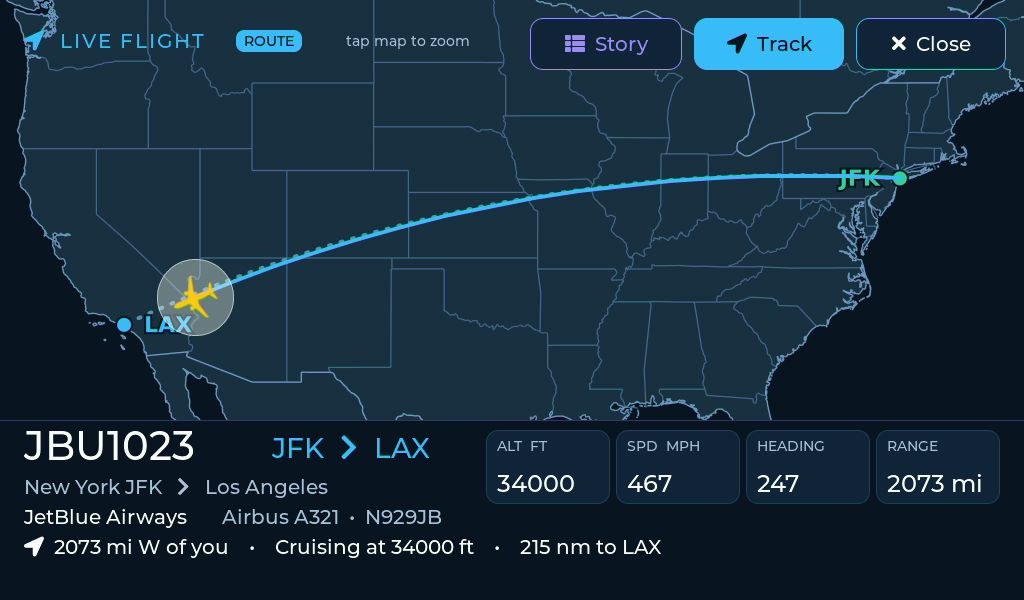
Two things on that screen were quietly wrong and are fixed. "NE of you" used to be the direction the aircraft was flying; it now means where the aircraft is from your home, which is what the words say. And a flight with no distance left no longer borrows the previous aircraft's figures.
A display that has been up for days can run short of memory for a map. It used to say the map was unavailable and leave it there. It now says Loading and tries again as soon as the memory frees up.
Your artwork stays current
The display pulls new and corrected aircraft art over Wi-Fi on its own, through Art Sync. On a few displays that had been switched off, so the corrections of the last weeks never arrived. With this update Art Sync comes back on, once, on every display. If you turn it off again under Menu › Status, the display now asks first, so a stray tap cannot leave you with old art.
Four corrections ride along with it: American and United 737-800s with the right split winglets, and both airlines' 737 MAX 8.
Questions: hello@wings-above.com.
Ed