Hi, Ed here.
A small update, v2.2.170, is going out to your display over Wi-Fi now. It fixes two things on the Details sheet that an owner spotted within hours of the last update and sent me with photos. Thank you for those.
The plane could draw as stripes
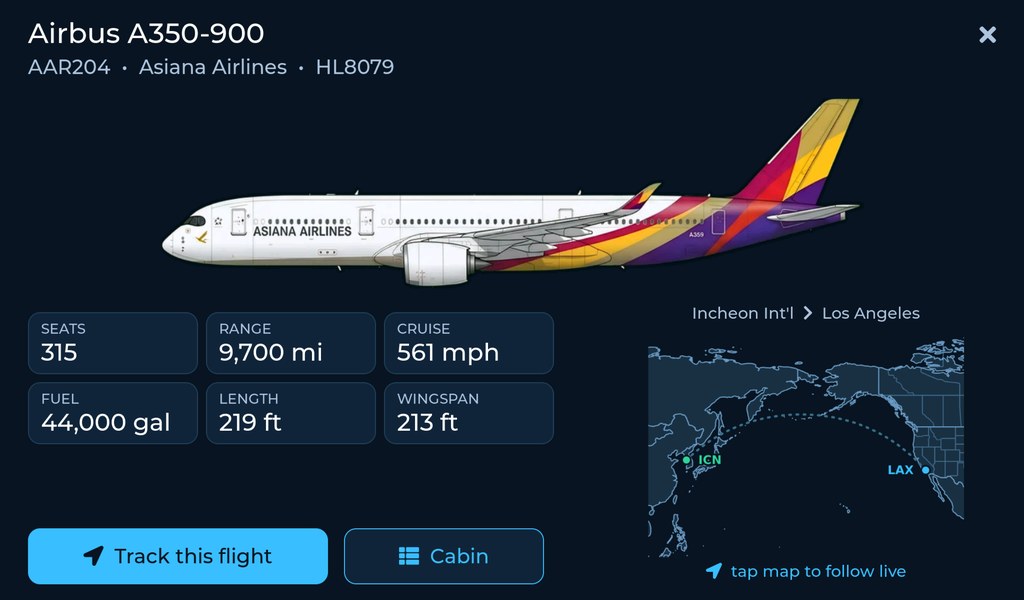
On some flights, tapping DETAILS gave the name, the figures and the buttons, but the aircraft picture came out as a band of horizontal stripes. The sheet was borrowing its picture from the card underneath, and when the card swapped its artwork while the sheet was open, the sheet was left reading the wrong one. It keeps its own copy now.
The route map had gone missing
The map in the corner of Details is downloaded only when the display has memory to spare, and the line was set at a level a display that has been running for an hour never reaches. So the map only ever arrived for routes seen in the first minutes after a restart, and looked like it had stopped working. The line now sits where the Live Flight map's already does, which the artwork downloads have used safely on every display for weeks. Maps come back as flights appear; routes your display already knows show right away.
How to get it
Your display installs it on its own the next time it checks, usually within a few hours. You will see a short Software Update screen and it restarts by itself; keep the power connected. If you would rather have it now, unplug the display for a few seconds and plug it back in. Menu › System Status should then read v2.2.170.
Seen something that looks wrong? hello@wings-above.com, with a photo of the screen if you can.
Ed